
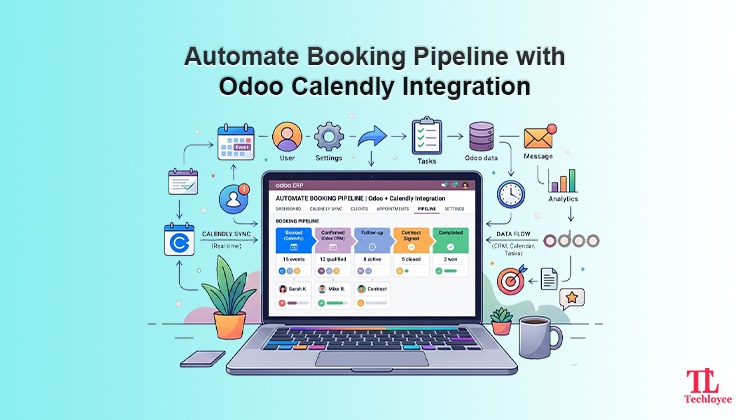
If your sales, HR, or support teams are still juggling between a Calendly booking page and an Odoo database, you already know the pain: a lead books a demo on Calendly, but nobody updates the CRM opportunity; an interview gets scheduled, but the recruitment module has no record of it. This disconnect quietly kills productivity, and it’s exactly what an Odoo Calendly Connector is built to fix.
Why Pair Calendly With Odoo?
Calendly is one of the most widely used scheduling tools because it removes the back-and-forth of finding a meeting time. A prospect, candidate, or customer picks an open slot from your calendar, and the event locks in automatically. Odoo, on the other hand, is the operational backbone for many businesses, running CRM, sales, recruitment, helpdesk, project, and calendar apps in one place.
The problem is that Calendly and Odoo don’t sync automatically. Meetings booked in Calendly stay in Calendly. There is no visibility of who booked what, when, and why within Odoo, unless the user enters the information manually. The Calendly Odoo integration solves the problem as it updates Odoo every time a booking, reschedule, or cancellation is done in Calendly.
Data management using silo systems leads to the following problems:
- Manual data entry burden: Copying exact meeting details takes much time and eats into the productivity of teams. Moreover, updates occur constantly, which puts teams in a constant loop.
- Pipeline latency: Sales get impacted directly if a meeting is missed, putting growth opportunities at risk.
- Calendar disconnects: Teams are susceptible to show up to cancelled meetings or double-booking critical client time slots when both platforms are not synced automatically.
How the Odoo Calendly Connector Actually Works
To understand how Odoo Calendly connector works, there’s a need to understand its underlying architecture.
Authentication Layer
At first, connector bridge the gap between two platforms by establishing a secure connection. For setting up a successful connection, there is a need of OAuth 2.0 to authorize API access for Calendly, while Odoo needs its XML-RPC/JSON-RPC external API or a custom Odoo module installed directly inside the Odoo instance. Through this authentication step, only authorized Calendly accounts are enabled to sync data with a certain Odoo database.
Event Subscription via Webhooks
Rather than depending completely on heavy API polling, which needs constant consumer server resources and causes delays in sync, the connector uses webhook listeners. By acting as instant notification triggers, it helps to automatically update changes in Calendly and Odoo. This maintains a uniform and accurate record across both platforms.
Middle Layer/Receiver Endpoint
The middle layer acts as an automatic traffic controller. When someone books a meeting on Calendly, it sends all relevant info (name, email, timezone, intake answers) to a dedicated receiver endpoint. This middle layer sits between Calendly and Odoo, catching incoming details from Calendly and passing them on to the Odoo system to update records.
Data Mapping and Transformation
Raw incoming data from Calendly is not adaptable to Odoo’s data infrastructure natively. Therefore, the connector helps to map fields logically. Invitee name or email is aligned to existing res.partner, meeting duration is matched with Odoo’s calendar event, and custom queries are mapped to new custom fields or logged as notes.
Record Creation or Update in Odoo
When the data is mapped to Odoo’s fields, the connector either creates a new entry or updates data for an existing one. This helps to avoid duplication of entries. In case of recruitment, the connector attaches the interview slot to the candidate’s record, and for support use cases, it logs the scheduled call against the relevant help desk ticket.
Two Way Sync
In case of advanced connectors, reverse sync can also be established. In this case, any change in Odoo’s data is automatically updated in Calendly. The connector keeps both systems consistent and ensures that Calendly isn’t the only source of truth.
Core Features of the Odoo Calendly Connector
Instant Lead Generation
Whenever there’s a new scheduled meeting on Calendly, a new lead is automatically created in Odoo right away. This updates your data in real time preventing any lost leads.
Smart Contact Matching
The connector checks if the guest email address already exists in your database. This keeps your data clean, organized, and removes discrepancies and repetition.
Question and Detail Extraction
Responds to pre-meeting questions on Calendly and fills the corresponding fields on the customer’s record in Odoo, giving sales reps all the updated info.
Automatic Status Updates
If a client reschedules or cancels a meeting on Calendly, the status changes automatically inside Odoo. This maintains an accurate sales pipeline.
Step-by-Step Implementation: How to Integrate Calendly with Odoo
Here’s a step-by-step guide to integrate Calendly with Odoo:
Step 1: Generate Credentials Sorted
Log into your Calendly account and search for “integrations and apps,” and then click API and Webhooks. Generate a personal access token and register custom OAuth to generate a client ID and client secret.
Step 2: Configure Settings Inside Odoo
Log into Odoo as an admin and switch on Developer Mode. Install whichever Calendly connector module you’ve chosen from the Apps menu, then head to Settings > Calendly Integration Configuration and drop in your Client ID, Secret, or PAT. Hit Authenticate & Authorize.
Step 3: Map Custom Fields and Pipeline Configurations
This is where you need to decide what happens to incoming bookings by default. Define which sales team picks them up, what pipeline stage they land in, and what tags get applied.
Step 4: Register Webhook Endpoints
Within Odoo, go to the connector configuration dashboard and select “register webhook subscriptions.” This triggers Odoo to reach out to Calendly’s API and register your webhook URL. Verify that the status for both creation and cancellation for invitations remains active.
Step 5: End-to-End Testing and Validation
Test the entire process in an incognito browser window using a dummy email to verify everything works smoothly. Schedule a meeting, make changes in it, and cancel to test whether each change is copied in Odoo.
Partner with Techloyce for Hassle-free Odoo Calendly Integration
Basic connectors get you generic field mapping, but that’s often not enough once you’re dealing with real sales workflows that involve multi-company setups, custom routing logic, and complex approval chains. That’s where Techloyce comes in.
Tailored Integration Architecture
Techloyce starts by looking at how your sales pipeline actually works today. Doesn’t matter if you’re on Odoo Online, Odoo.sh, or running on-premise; they design the data flow to match your specific stages, custom models, and team structure rather than forcing you into a generic template.
Custom Module Development
A standard connector stops at “create a CRM lead.” Techloyce takes it further:
- Automatically generating quotations (sale.order) when someone books a paid event type
- Connecting bookings to Odoo Field Service or Helpdesk, so a confirmed appointment can trigger a service ticket or job assignment
- Handling multi-currency and multi-org configurations for teams operating across regions
Enterprise Security & Webhook Resilience
Techloyce puts real engineering into the security and reliability side, enabling proper error handling, automatic retry queues if a webhook gets missed, and encrypted storage for OAuth tokens. The goal is that you don’t lose data even if there’s an API issue or your server goes down for maintenance.
Comprehensive Testing, Training, & Support
Our team manages the complete lifecycle, including sandbox testing, production rollout, training your team on how to use it, and offering ongoing support so the integration keeps working as Calendly and Odoo push out new API versions.
Streamline Your Workflow with Techloyce
Integrating Calendly with Odoo turns separate scheduling and CRM processes into an automated, unified workflow. By leveraging a dedicated Odoo Calendly Connector, your business eliminates manual data entry, shortens response times, and keeps customer information aligned across teams. Contact Techloyce today to build an efficient Calendly Odoo Integration tailored to your operational needs.