
Running a small business is overwhelming as there’s a constant struggle to grow, manage operations, build a loyal clientele, and track business performance. But the last thing small business owners want to deal with is financial problems. Managing finances using manual spreadsheets and basic accounting tools can lead to major challenges that may drive a business to failure.
To keep your business from reaching this point, there’s a need to take an all-in-one solution onboard. This is where Odoo comes in. It offers a comprehensive accounting and ERP solution that aids businesses to automate daily financial tasks, track cash flow in real time, manage invoices efficiently, and simplify tax compliance, all from one centralised platform.
What is Odoo Accounting?
Odoo accounting is a consolidated cloud-based financial management software that directly integrates with the broader Odoo ERP platform. Small businesses can have a 360-degree view of their financial health by syncing it with sales, inventory, and HR.
Core features include:
- Automated Bank Synchronisation
- Integrated Invoicing
- Multi-Company and Multi-Currency Support
- Global Tax Management
- Dynamic Financial Reporting
Why Small Businesses Need Odoo Accounting
Small businesses often rely on scattered tools and spreadsheets that create discrepancies in data. Odoo accounting setup and implementation for small businesses is a valuable solution to overcome these challenges. Businesses benefit through:
Centralised Financial Management
The Odoo accounting module enables companies to run all financial tasks from a single system, instead of managing invoicing, payroll, expenses, and inventory on distinct systems. This centralised system approach enhances data consistency and enables teams to have access to timely financial data. Additionally, this integration eliminates duplication, improves quality of data, and enhances day-to-day accounting activities.
Automation of Accounting Processes
One of the significant advantages of Odoo Accounting is its ability to automate tasks. It can automate the generation of invoices, and reminders about paying an invoice, recurring payments, calculation of taxes, bank reconciliation, etc., reducing manual work. It not only saves time during the accounting process but also minimises the chances of human error, which inevitably creates room for mistakes in manual accounting.
Cost-Effective ERP Solution
Small businesses generally struggle with limited budgets. Therefore, pricing becomes one of the deciding factors when choosing accounting software. Odoo is a modular and flexible ERP system, allowing your business to pick and choose the modules it requires. Odoo is more cost-effective than traditional ERP systems both in terms of implementation and maintenance, and also offers scalability for future expansion.
Real-Time Financial Insights
Odoo Accounting offers real-time dashboards and financial reports that enable business owners to keep a close watch on their finances. Profit and loss statements, cash flow reports, balance sheets, tax reports, and receivable reports are available at the blink of an eye for small businesses. These insights help make faster and more informed decisions.
How to Set Up and Implement Odoo Accounting for Small Businesses?
The implementation of Odoo Accounting can be successful only when it is done in a structured manner.
Analyse Business Requirements
The initial step is to understand the accounting requirements, processes, and problems of the business. Businesses should review the existing accounting systems and determine what they desire to have in the future. Based on this analysis, you can select the suitable Odoo modules and have a clear idea about the implementation strategy.
Choose the Right Odoo Version
Odoo comes in two editions: Community and Enterprise, each catering to specific business needs. For small businesses and startups, the most viable option is the Community edition, as it offers foundational modules. Moreover, it is highly customisable, self-hosted, and ideal for businesses looking for a cost-effective solution. However, if businesses require advanced automation and support features, the Enterprise edition is a more suitable choice.
Select the Required Accounting Modules
The modularity of Odoo allows businesses to only use the apps they need. Based on their requirements, small businesses can opt for accounting, invoicing, expenses, inventory, payroll, or purchase management. The right modules can simplify implementation and reduce the complexity of using them.
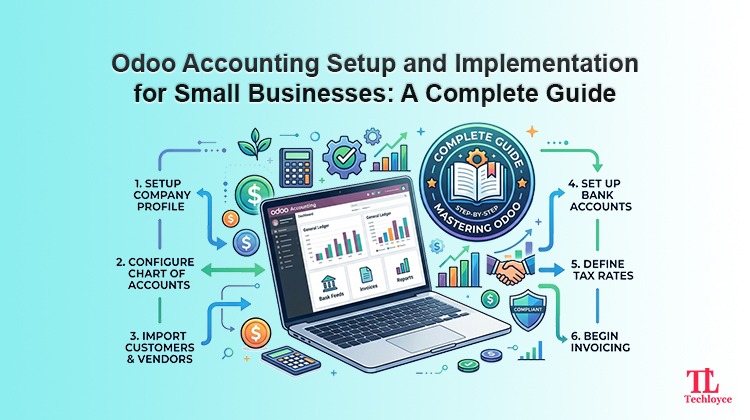
Configure the Chart of Accounts
Among the several components of accounting setup, the charts of accounts are a crucial one as it serves to classify the financial transactions. It is important for businesses to set up and configure assets and liabilities, income and expense accounts, and tax accounts. Odoo also offers localisation features which help to stay compliant with regional accounting standards.
Configure Bank Accounts and Payment Methods
Businesses need to configure bank accounts and a payment gateway to initiate auto-payment tracking and reconciliation. Odoo enables multiple payment methods, including bank transfers, cards, and online payment providers. The configuration is necessary to improve transaction visibility and simplify financial management for small businesses.
Data Migration
One of the most critical periods of implementation is migrating financial data from existing systems. The businesses are required to transfer the information of the customers, vendor details, balances, invoices, and transaction history accurately. Clean and validated data migration ensures smooth performance after implementation.
Employee Training
Small businesses need to train their employees so teams can adapt to the new accounting system easily. Employee training is needed on the processing of invoices, expense management, reconciliation, and report generation. Training enhances the efficiency of teams and boosts productivity with Odoo Accounting.
Testing and Go-Live
Before going live, it is important to test all workflows. This helps to flag any configuration errors. This includes testing of invoices, taxes, reports, user rights, and payments processing. Once testing has been done and workflows proven, the company can rest assured to go live with the new system.
Common Challenges in Odoo Accounting Implementation
The most frequent issues faced by businesses in adopting Odoo accounting are:
Poor Planning
If there is no clear roadmap of implementation, businesses can have delays, budget overruns, and operational confusion. The successful implementation depends on planning, with definite objectives and schedules.
Data Migration Errors
Migrating cluttered data can lead to reporting inaccuracies and ultimately disrupt financial processes.
Lack of Employee Training
Adequate training is necessary to help employees onboard smoothly. In case of inadequate training, employees can make costly mistakes.
Over-Customisation
Odoo allows businesses to customise workflows. However, too much customisation can lead to increased implementation complexity. Moreover, it is also costly to maintain customisation charges in the long run.
Best Practices for Successful Odoo Accounting Implementation
Start Small
Migration should always start with core accounting modules. When teams get on-hands experience, businesses can then expand gradually as operational needs grow. Not only does it simplify user adoption and avoid implementation risks.
Work with an Experienced Odoo Partner
For successful implementation, small businesses should rely on an experienced Odoo implementation partner like Techloyce. It helps to avoid technical issues during migration and provides ongoing support throughout the implementation process.
Execute a Phased Go-Live
Instead of migrating entirely at once, use a phased approach. Go live with a single module first and gradually move towards complete migration. Prepare for a temporary dip in efficiency post-launch and ensure you have continuous, responsive support to handle immediate troubleshooting.
Monitor Performance Continuously
After implementation, businesses need to track system performance regularly and gather user feedback. Continuous monitoring helps in improving workflows and optimising accounting operations over time.
How Techloyce Can Help with Odoo Accounting Setup and Implementation
As a trusted Odoo partner, Techoyce ensures successful Odoo accounting setup and implementation for small businesses.
Business Analysis and Consultation
Techloyce analyses your specific business processes and assesses your accounting needs to devise a custom Odoo Accounting implementation strategy that fits your business operations.
Odoo Accounting Setup and Configuration
It aids in the configuration of full accounting systems including, charts of accounts, taxes, invoices, and financial settings, on the basis of your business requirements.
Data Migration and System Integration
Techloyce securely migrates financial data from existing systems and integrates Odoo Accounting with CRM, sales, inventory, and other modules.
Training, Support, and Maintenance
Techloyce offers employee training, testing, and ongoing support to make sure that businesses have a smooth usage experience and long-term system performance.
Take the Next Step Toward Smarter Accounting
Implementing Odoo Accounting can significantly transform how small businesses manage their finances. It improves accuracy, automates routine tasks, and provides real-time financial visibility. However, successful implementation requires proper planning.
That’s where expert advice proves to be invaluable. Techloyce can assist you every step of the way to make your financial operations simpler and put Odoo Accounting to the right use. Simplify your financial processes by using Odoo Accounting the right way.