
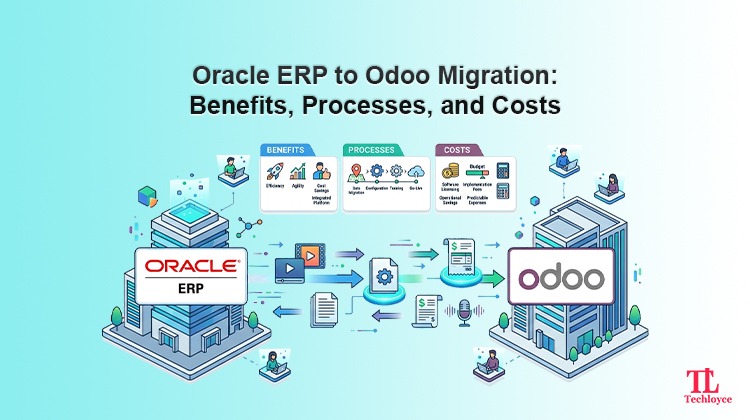
For years, Oracle has been the preferred choice for businesses using legacy enterprise resource planning (ERP) solutions. However, since agility has become increasingly important, organisations are now seeking solutions that reduce operational complexity, minimise licensing costs, enhance usability, and scale as business grows.
If your business is outgrowing the high complexity and increasing costs of Oracle ERP, Odoo is a strong alternative solution. It is a suite of open-source business management software that is designed to meet the requirements of contemporary businesses.
Make the migration process even more simplified by employing the right strategy with Techloyce. As an experienced Odoo implementation partner, Techloyce can make the transition faster, smoother, and more secure.
Why Businesses are Switching: Oracle vs Odoo
Before delving into “how” migration is done, you need to understand “why” it is necessary. While Oracle is a comprehensive suite, Odoo has emerged as a strong contender by offering enterprise-grade features at more affordable prices.
Primary factors driving the Oracle ERP to Odoo migration are:
Cost Structure
One of the significant reasons for switching to Odoo is the cost structure. Oracle ERP has a high licensing fee. Businesses that are relying on Oracle also face maintenance and consultant charges. Moreover, advanced functional modules like enterprise performance management cloud, risk management cloud, supply chain, and manufacturing modules etc are only available as paid add-ons. On the contrary, Odoo works on a “pay-per-use” model, which is cost effective for growing businesses.
User Experience
Businesses outgrow Oracle due to its traditional and often complex user experience (UX) that requires steep training. Odoo, on the other hand, has a modern, intuitive, and highly integrated user experience. There are efficient dashboards and workflows that improve functionality. In short, Odoo’s user experience can be described as having a low-code, familiar feel.
Customisation
Oracle ERP offers limited customisation options, which are rigorous, time-consuming, and expensive. There are no modifications to the source code or database structure, limitations in functionality customisation, and limited report modification. With Odoo, businesses can customise dashboards, menus, add fields, create new app models without technical expertise. Its “Odoo Studio” no-code customisation ensures high flexibility.
Updates
Another major Oracle ERP to Odoo migration factor is updates. Businesses using Oracle ERP encounter major, complex upgrades that need planning, downtime, and customisation fixed. In contrast, updates in Odoo are frequent, seamless, and backward-compatible.
How to Migrate From Oracle ERP to Odoo?
For a successful Oracle ERP to Odoo migration, follow these steps:
Step 1: Conduct a Detailed System Assessment
First, conduct a detailed assessment of existing data in Oracle ERP. Map all active modules such as finance, HR inventory, CRM, manufacturing etc. Check customisations, reporting formats, and third-party integrations. Get familiar with the data flow procedure between departments and systems. Through this assessment, businesses are able to determine what data needs to be migrated and what can be simply omitted.
Step 2: Define Migration Strategy
After mapping all modules, teams can easily remove discrepancies in the data. It is an excellent opportunity for businesses to streamline operations and remove inefficiencies. Set clear goals defining the main purpose of migration (e.g., cost reduction, automation, or improved reporting). On the basis of the complexity of your data, devise the right migration strategy. There can be full migration, phased migration, or module-based migration.
Step 3: Data Cleansing and Preparation
Clean data is the foundation of a successful transition. For this purpose, there’s a need to delete duplicate records and remove irrelevant or outdated fields. There should be a uniform formatting across all entries. With clean data, businesses can prevent themselves from downtime and data risks in migration.
Step 4: Design Odoo Architecture and Configuration
Install the Odoo system as per business needs. As per your business requirements, configure modules like accounting, inventory, CRM, sales, and manufacturing. Map Oracle ERP to the Odoo process. It is highly significant to ensure synchronisation between Odoo and the relevant company operations before starting migration.
Step 5: Data Mapping from Oracle ERP to Odoo
Data Mapping is used to align the Oracle ERP fields with the Odoo database. Customer records, invoices, and stock information, for instance, need to be properly synchronised. This step helps to ensure data consistency and prevents the loss of data during transfer. For more accuracy, businesses should create mapping documents against each key entity and validate them with relevant stakeholders. Seamless migration is ensured via accurate mapping.
Step 6: Develop Custom Modules and Integrations
In case of custom workflows in Oracle ERP, businesses need to recreate them in Odoo. Custom development is also necessary for smooth integration with third-party applications such as payment gateways, shipping services, or business intelligence systems. This stage is important to ensure that all business-critical operations proceed smoothly after switching to Odoo.
Step 7: Execute Data Migration Process
After completion of all pre-requisites, the actual migration process starts at this step. Data migrates from Oracle ERP to Odoo in a designated format. This step is usually facilitated by migration tools or third-party partners.
Step 8: Perform Testing and Validation
Testing needs to be undertaken to ensure the migration has been successful. Functional testing helps to verify the accuracy of each module of the application, and data validation helps to verify the authenticity of the data. With user acceptance testing (UAT), employees can test actual situations. If something is found to be wrong during testing, it is corrected prior to going live.
Step 9: Train Users and Prepare for Adoption
Once the migration is done, teams need to be trained to effectively use Odoo. Role-based training enables different departments to adapt more quickly. For this purpose, there’s a need for during and post-migration support.
Step 10: Go Live
Testing and training are completed, and the system is deployed for live use. For risk reduction, it is recommended to use a controlled go-live approach. During the first days, IT teams closely watch the system’s performance. With continuous monitoring, the ERP system Odoo can be ensured to be stable and successful over time.
Common Challenges in Oracle ERP to Odoo Migration
Migration is not as smooth as it seems. Major challenges are:
Data Compatibility Issues
One of the most commonly faced issues is data compatibility. When data is migrated, there are increased chances of mismatched fields, missing records, and inconsistent formats.
Customisation Migration
When there’s highly customised data in Oracle ERP systems, it is difficult to replicate the same in Odoo. By copying directly, there can be severe issues. Therefore, businesses need to redesign workflows and custom modules as per Odoo’s infrastructure.
User Resistance
Teams that are used to working on Oracle ERP may resist switching to a new system. The resistance can also lead to slow adoption, which can ultimately affect productivity.
Downtime Risks
Without a structured approach, migration can fail miserably. This increases system downtime, ultimately affecting daily business operations. It is considered one of the most critical risks in the ERP migration process.
How to Overcome Oracle ERP to Odoo Migration Challenges
To avoid disruptions and ensure a successful migration, there’s a need for the right implementation partner. This is where Techloyce comes in. With years of experience in providing Odoo migration implementation services, Techloyce provides end-to-end services to companies for ERP migration, which includes the Odoo ERP assessment service, data migration, Odoo configuration, integration, module development, and training.
Regardless of whether you have planned to implement Odoo ERP by fully migrating your existing ERP solution or through a phase-by-phase process, choosing the right implementation partner is crucial.
Final Thoughts
Oracle ERP to Odoo migration is not a mere software replacement. It is a strategic shift towards increased efficiency, cost reduction, and modernised operations. With the right migration partner like Techloyce, businesses can successfully transition from Oracle ERP to Odoo while minimising risks and maximising long-term value.
Whether you are a growing company struggling to maintain an expensive ERP or an established business seeking more flexibility, Odoo offers a powerful alternative capable of supporting modern business operations.
Contact our team to start your Oracle ERP to Odoo migration journey with confidence.