
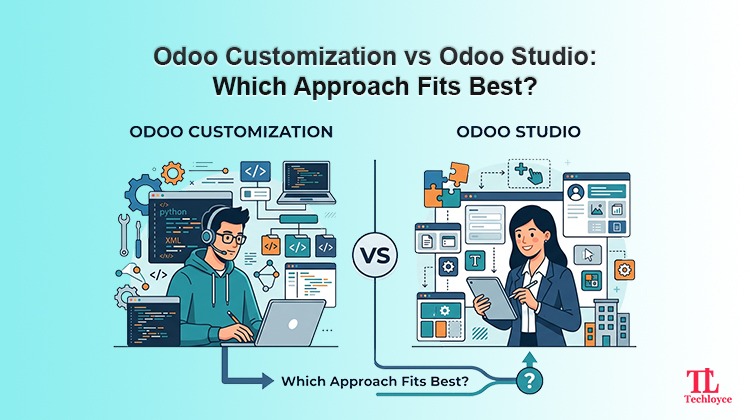
Odoo is a prominent ERP platform offering modular design, an open-source foundation, and extensive customization options. But when businesses require tailored solutions to match their requirements, they inevitably have to choose between Odoo customization and Odoo Studio. Both solutions enable personalization, but they solve different problems and come with different trade-offs. So, if you pick the wrong one, you can either waste money on unnecessary development or get locked into a fragile setup that breaks with every upgrade.
What is Odoo Studio?
Odoo Studio is a no-code/ low-code application built into Odoo Enterprise. It offers users a visual, drag-and-drop interface to modify how Odoo looks and behaves without touching a single line of Python or XML.
Through Odoo Studio, a business user or admin is capable of:
- Adding, removing, or rearranging fields on forms and list views
- Creating entirely new fields (texts, numbers, dates, many2one relations, etc.)
- Building new simple models (necessarily mini custom apps) using existing building blocks
- Designing new reports and editing PDF templates
- Modifying approval workflows and automated actions
- Adjusting access rights and record rules
- Creating custom dashboards and kanban views
Via its user-friendly UI, Odoo Studio exposes Odoo’s own internal development tools. Every change is recorded as real data in Odoo’s database; e.g. new fields become actual database columns, new views become real records. It’s a genuine configuration, just without code.
When Odoo Studio is Suitable
In simple words, Odoo Studio is suitable when the requirement is additive rather than transformative. For instance, you need an extra field to track a customer’s preferred delivery time, you want an approval step before a purchase order over $5,000 is confirmed, or your invoice needs a new logo and a QR code. These are configuration-level needs, and Odoo Studio handles them in minutes rather than days.
It also puts a degree of independence back in the hands of the business. Therefore, a trained operations manager doesn’t have to file a ticket and wait for the developer to add a field. They can do it themselves in a couple of minutes.
Limitations of Odoo Studio
Odoo Studio operates within Odoo’s existing architecture. It is not capable of:
- Writing genuinely new business logic such as complex conditional calculations, multi-step algorithms, custom validation chains that span multiple models
- Integrating deeply with third-party systems via custom APIs
- Modifying core module behaviour at a fundamental level, e.g., rewiring how Odoo calculated landed costs or how the accounting engine posts journal entries, etc.
- Building performance-optimized solutions for high-volume, complex data operations
- Creating fully custom user experiences that diverge from Odoo’s standard UI patterns
In short, Odoo Studio is a configuration tool, not a development tool. It extends Odoo along the grain of its existing design; it doesn’t reshape the grain itself.
What is Odoo Customization?
Odoo customization refers to writing actual code – Python for backend logic, XML for views, JavaScript for frontend widgets – to extend or modify Odoo’s functionality. This is done by developers working within Odoo’s modular architecture, typically by testing custom modules that inherit from and extend existing ones.
Custom customization can achieve things like:
- Building entirely new business modules tailored to a specific industry (e.g., a textile production tracking system, a real estate commission engine, or a freight forwarding module)
- Complex integrations with external systems such as ERPs, government tax portals, payment gateways, IoT devices, or legacy software via REST/SOAP APIs
- Custom algorithms for pricing, inventory allocation, scheduling, or forecasting
- Performance tuning for businesses processing millions of records
- Deep UI/UX customization, including entirely custom frontend components built with Odoo’s JavaScript framework (OWL)
- Custom automated workflows that involve several modules with intricate business rules
- Multi-company, multi-currency, or multi-warehouse logic that goes beyond Odoo’s default handling
When Custom Odoo Customization is Suitable
Custom customization gives you essentially unlimited flexibility. This is why mid-size and enterprise businesses with unique operational processes, such as manufacturers with complex BOMs, distributors with intricate pricing tiers, and service companies with non-standard billing cycles, almost always need custom development at some point. This is the right approach when your requirement goes beyond simple configuration and demands genuine software development, meaning you need custom business logic, deep third-party integrations, or entirely new functionality that Odoo’s native tools and Studio can’t produce. For example: a retail company using Odoo needs to sync inventory in real time with Amazon and Shopify stores, so that a sale on one platform automatically deducts stock everywhere else. Since this requires connecting to external APIs and writing logic to handle stock updates across systems, it can’t be done through Studio.
Limitations of Odoo Customization
The improved flexibility of Odoo customization also requires meticulous maintenance.
- Upgrade and complexity: Custom modules need to be upgraded and tested against each release of Odoo. The poorly written code may break when upgrading
- Technical debt: Code needs documentation, version control, and a development lifecycle
- Cost and time: Customization demands skilled Odoo developers, proper scope management, quality assurance, and a longer project life cycle compared to Odoo Studio modification
- Dependency on developers: After deployment, any additional modifications to custom code demand developer intervention, unlike Studio changes that can be done by business users
Core Difference between Odoo Studio and Odoo Customization
The cleanest way to think about the difference:
| Aspect | Odoo Studio | Odoo Customization |
| Skill required | Business user/ admin, no coding | Odoo developer |
| Speed | Minutes to hours | Days to weeks/ months |
| Complexity ceiling | Field additions, simple workflows, reports | Complex logic, integrations, new modules |
| Licensing | Requires Odoo Enterprise | Works with community or enterprise |
| Upgrade risk | Low (native Odoo objects) | Moderate to high (needs maintenance) |
| Cost | Included in enterprise subscription | Project-based development cost |
| Ownership of changes | Business teams can self-manage | Needs ongoing developer support |
| Suitable For | Incremental, configuration-level needs | Structural, logic-heavy, integration-heavy needs |
Odoo Studio modifies the surface of Odoo. Customization can reshape its skeleton. Neither is “better” in absolute terms, as they solve different classes of problems.
How to Decide Which One Your Business Needs
Ask these questions before choosing a path:
Is the change additive or transformative?
Strategically think about goals. If your goal is additive, like adding a field, tweaking a report, or adding an approval step, Odoo Studio should be your choice. If your goal is transformative like building a new pricing engine or integrating with third-party logistics, you should go for Odoo Customization.
Does it require logic beyond simple conditions?
Odoo Studio handles basic automated actions like if field X=Y, do Z. Anything involving loops, complex calculations across multiple records, or external API calls needs code.
Who will maintain it long-term?
If you want your internal team to manage changes without developer dependency, Odoo Studio is more sustainable. If the logic is core to your competitive operations, invest in proper custom development with documentation.
What’s your Odoo edition?
Odoo Studio requires enterprise. If you’re on community edition, customization is your only path for extending functionality; that’s worth factoring into your budget planning early.
What’s your upgrade strategy?
Businesses planning to stay on the same Odoo version for years worry less about maintenance overhead. Businesses planning to upgrade frequently should weigh custom development costs more carefully, or ensure it’s developed following Odoo’s best practices for maintainability.
The Practical Reality: Most Businesses Need Both
In real-world implementations, it’s rarely an either/ or decision. A well-run Odoo project usually uses Odoo Studio for the quick, everyday tweaks like extra fields, minor report edits, and approval flows. For a handful of processes that are genuinely unique to the business, teams rely on professional customization.
Trying to force complex logic into Studio leads to fragile, hacky workarounds. Trying to go for customizations for every minor field addition wastes budget and slows down the business unnecessarily. The smartest approach is having a partner who understands both, someone who can distinguish whether your requirement needs a quick Studio fix or needs a real customization instead.
How Techloyce Can Help
At Techloyce, we specialize in Odoo implementation, customization, and ongoing support for businesses across industries. Our team has hands-on experience with both sides of this equation: we help clients use Odoo Studio effectively for day-to-day configuration, and we build robust, upgrade-safe custom modules and integrations when the business genuinely needs deeper development.
We don’t push rigid one-size-fits-all solutions. Our approach starts with understanding your actual workflows, identifying what can be solved with simple configuration, and scoping real development only where it adds genuine business value, saving you both time and unnecessary cost.
Ready to Unlock the Full Power of Odoo?
Start tailoring your Odoo setup to work exactly the way your business operates. Reach out to Techloyce today for a free consultation, and let’s figure out together whether Odoo Studio, Customization, or a mix of both is the right path forward for you.